
Kling AI review 2026: full test, use cases, and real limits
A complete 2026 Kling AI review: text-to-video, image-to-video, camera control, Kling 3.0 quality, credit costs, and real production workflow with honest limits.
- Kling AI is strongest for generating b-roll, creative concepts, social clips, and animated stills—not for replacing cinematographers or complex narrative productions.
- Kling 3.0 (2026) delivers noticeably better motion realism and character consistency than earlier versions, making it viable for commercial-level creative work.
- The credit system is transparent but requires planning: 1080p with native audio costs 12 credits per second, so longer clips add up quickly.
- The best results come from a specific prompt + 3–5 iterations + post-production editing. Publishing the first generation raw is the most common mistake.
Quick verdict: what Kling AI is actually good at
Kling AI is an AI video generation platform built for people who need visual output without a camera crew. Its most accurate promise is not "describe anything and get a broadcast-ready video." A more honest description: give Kling a specific prompt or a source image, and it generates a short cinematic clip with realistic motion, coherent lighting, and usable quality for social media, concept work, and b-roll.
That precision matters. AI video tools often look extraordinary in curated demos where the subject is photogenic, the prompt is clean, and the output only needs to feel impressive for thirty seconds. Real production is different. A YouTube channel needs consistent visual language. A brand campaign needs output that matches specific aesthetics. An e-commerce ad needs clarity about product, motion, and context. Kling accelerates the generation step, but it does not remove the need for creative direction, iteration, or post-production.
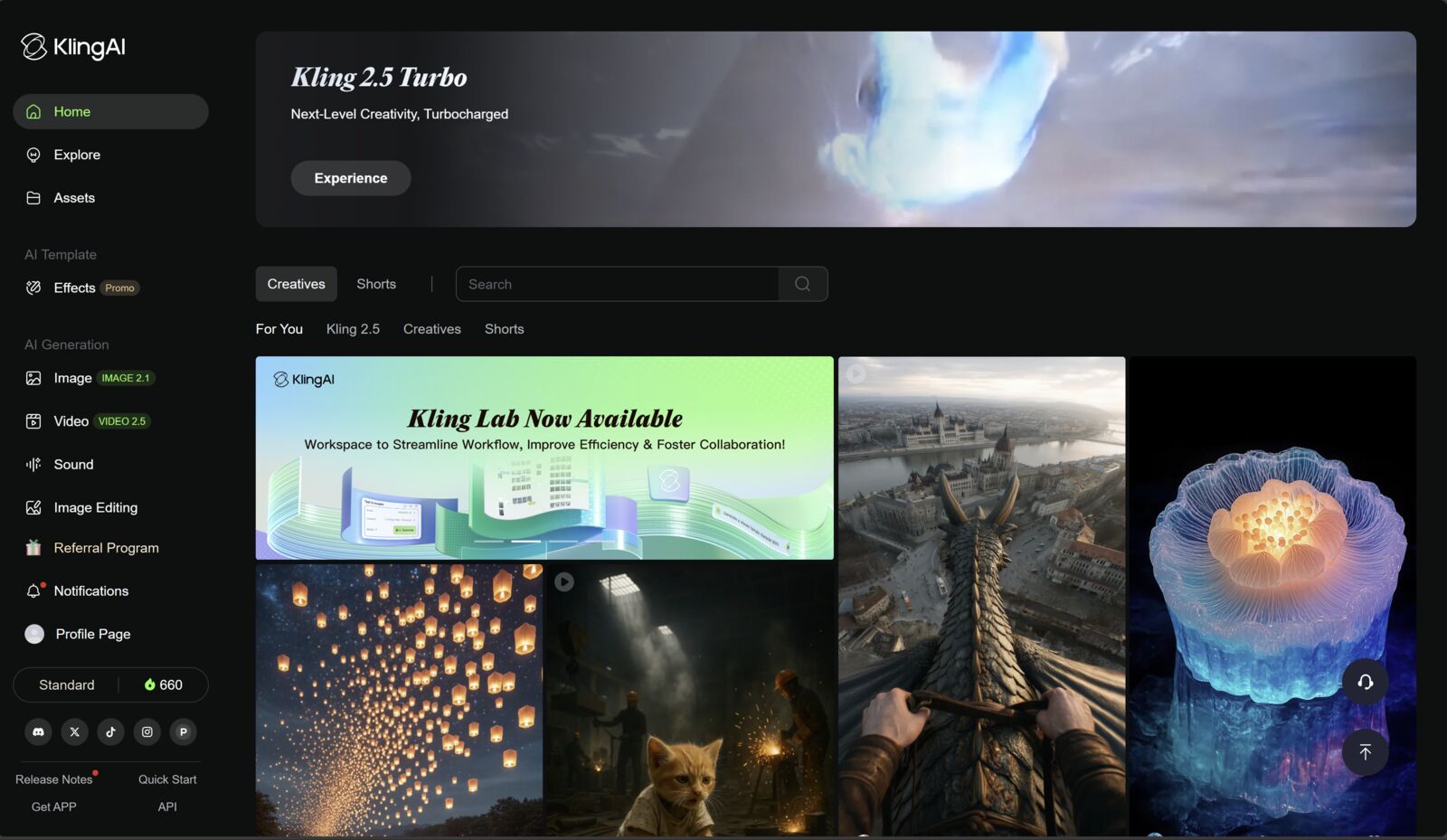
In 2026, Kling AI has moved well past its original positioning. Kling 3.0 shows measurable improvements in motion realism, character consistency, and camera control. The platform supports text-to-video, image-to-video, camera trajectory definition, and native audio generation. The credit system is now more transparent with published costs per second per resolution and feature combination.
Our verdict: Kling AI is worth testing if you produce video regularly and want a faster path from concept to first cut. It is especially valuable for creators, agencies, and brands that need to generate visual options quickly. It is less compelling if your output quality depends on precise human performances, complex practical effects, or highly specific brand aesthetics that AI cannot reliably reproduce.
Who should consider Kling AI
Kling AI is a good fit for solo creators who regularly produce video content. YouTube channels, faceless content creators, social media managers, and course producers can use Kling to generate visual sequences, b-roll alternatives, and animated content without booking a shoot or sourcing expensive stock footage.
Marketing agencies can use Kling for rapid concept visualization. Before committing to a full production, teams can generate multiple visual directions in minutes. This makes client presentations faster and allows creative teams to test messaging, visual style, and pacing before production begins.
E-commerce brands will find specific value in image-to-video. Take an existing product photo and animate it with subtle motion, environmental context, or stylized camera movement. The output is not always perfect on the first try, but it can generate usable social media content and ad concepts at a fraction of traditional video production cost.
Advanced users may treat Kling as one layer in a larger production stack. Generate the visual content in Kling, add voiceover using ElevenLabs, assemble captions and final edits in Pictory, and deliver a finished asset. In that setup, Kling handles the visual generation step, not the entire production.
What Kling does well
Kling does well at removing the blank-canvas problem for video. Many creators and marketers avoid video because sourcing footage, planning shots, booking locations, and managing production logistics is expensive and slow. Kling compresses that process into a prompt and a few minutes of generation time.
The image-to-video workflow is a standout capability. Upload a still image—a product photo, an AI-generated illustration, a portrait—and Kling generates believable motion. The movement follows the subject, responds to implicit physics, and maintains visual consistency with the source. This is the most immediately useful feature for commercial workflows because you often have existing visual assets that can be animated rather than generated from scratch.
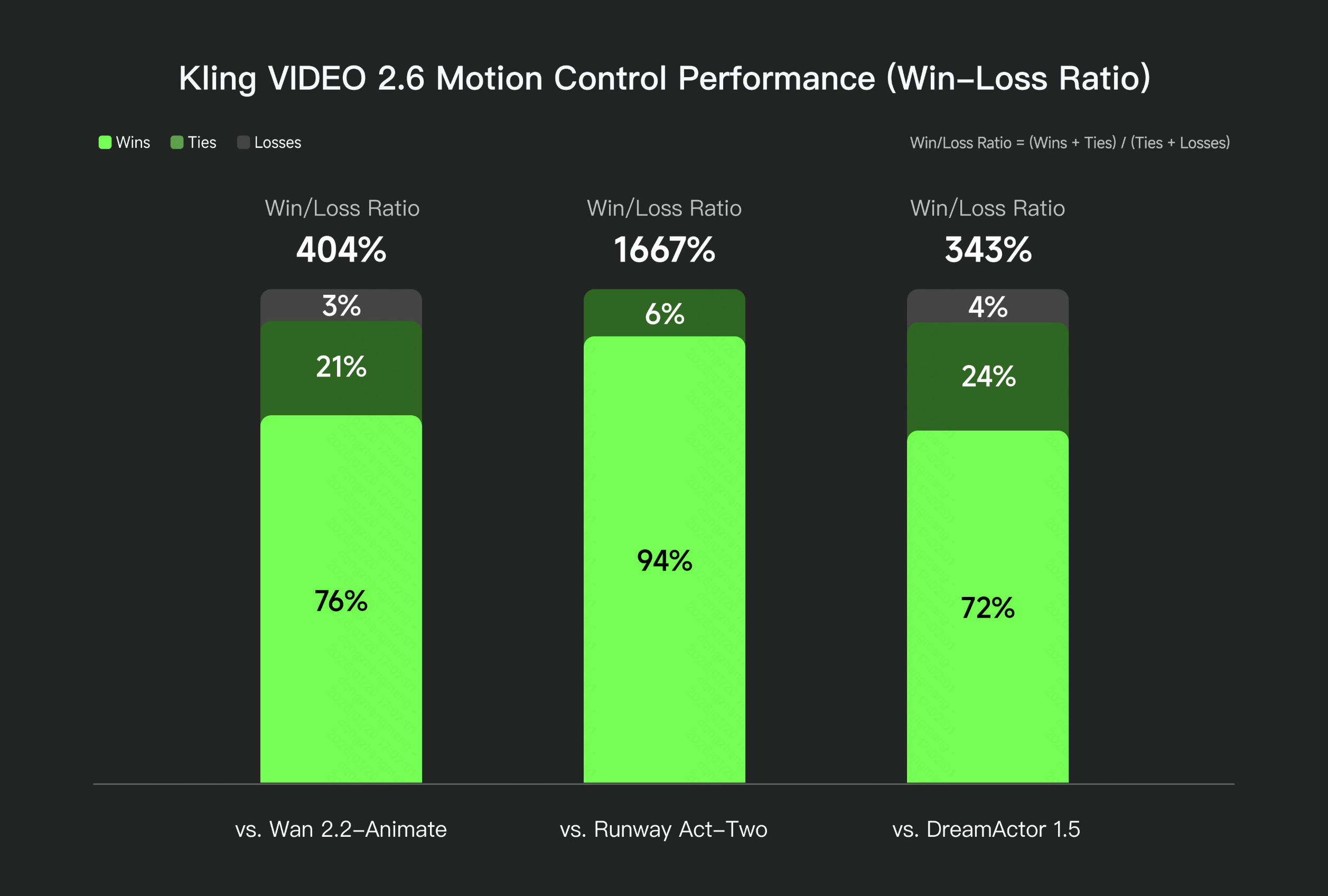
Camera control is a meaningful differentiator versus earlier AI video tools. You can specify pan, tilt, zoom, push-in, orbit, or crane movements. Combined with a strong prompt, this means you can produce shots that feel cinematically directed rather than randomly generated. In independent benchmarks, Kling VIDEO 2.6's motion control achieves a 1667% win-loss ratio against Runway Act-Two and 404% against Wan 2.2-Animate:
Text-to-video in Kling 3.0 has improved enough to generate usable concept footage for many professional workflows. Motion is more coherent, subjects hold visual consistency across longer clips, and the overall quality floor is higher. It is still not at the level of a controlled studio shoot, but it is well past the uncanny valley that made earlier AI video tools feel unpresentable.
Key features to understand before judging Kling AI
Kling's feature set is best understood across four groups.
The first group is text-to-video. You describe a scene in natural language and Kling renders it as a 5 or 10-second video clip. Quality depends on prompt specificity. A vague prompt ("a person walking in a city") produces generic output. A specific prompt ("a young woman in a red coat walking through a rainy Tokyo street at night, slow push-in camera, cinematic") produces much more usable footage.
The second group is image-to-video. You supply a source image and Kling animates it. You can provide motion direction hints, and the model generates movement that respects the original composition. This is valuable for product shots, portraits, illustrations, and any existing visual asset you want to bring into motion.
The third group is camera control. Kling allows you to define camera trajectories explicitly. This is not just a stylistic choice—it affects storytelling. A push-in communicates focus and intensity. A slow pan suggests environment and scale. An orbit creates dimension. Having camera control in an AI video tool moves the output from generated footage to directed footage.
The fourth group is audio and export. Kling supports native audio generation (ambient sound, sound design) and standard video export formats. Audio quality is improving but still often benefits from replacement or augmentation with higher-quality voice and music in post-production.
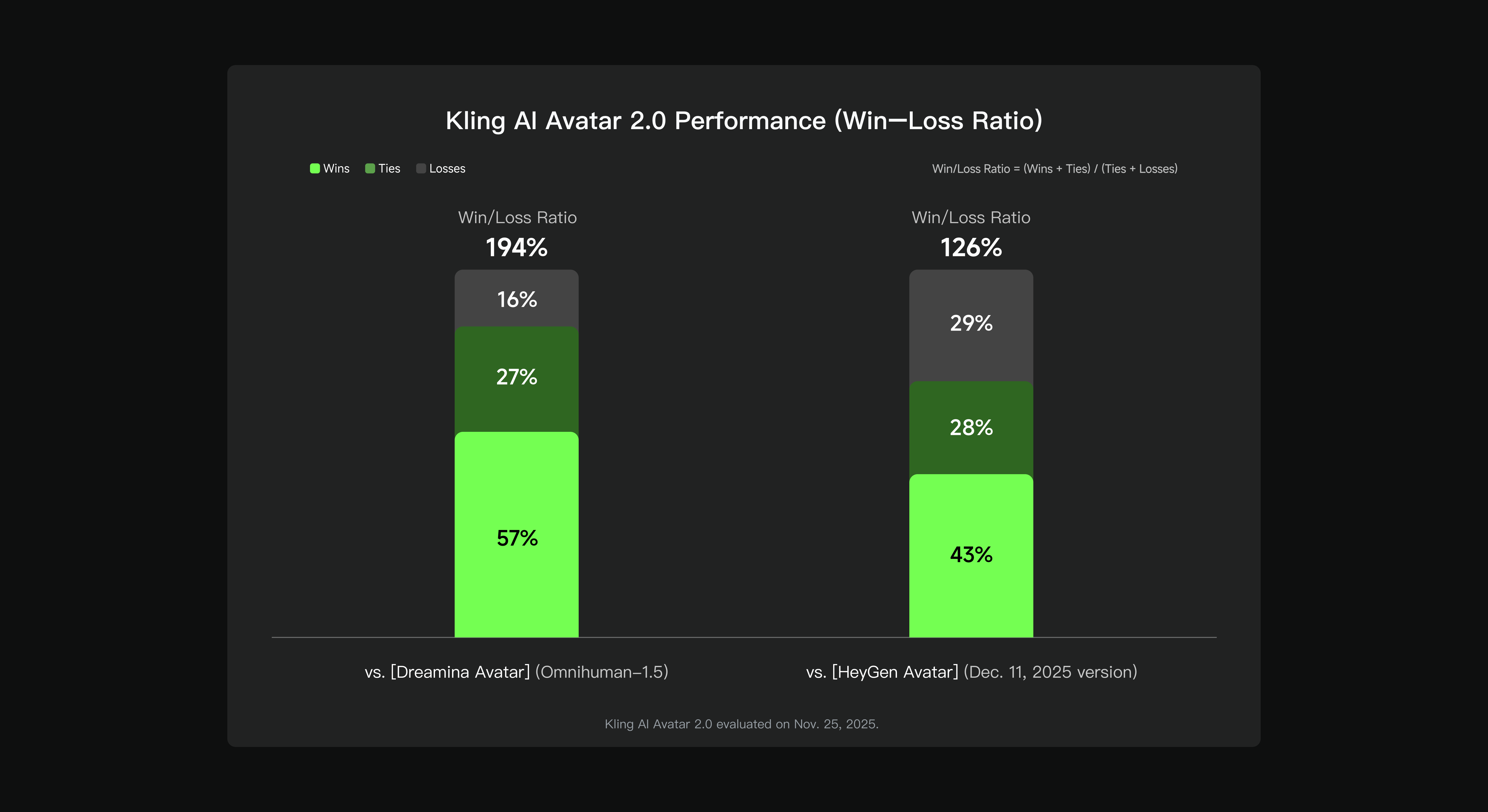
Kling's Avatar 2.0 also demonstrates strong benchmark performance for talking-head and presenter-style generation, with a 194% win-loss ratio versus Dreamina Avatar and 126% versus HeyGen Avatar:
| Use case | Kling feature | Human check |
|---|---|---|
| Generate concept b-roll | Text-to-video, camera control | Iterate 3–5 times, select best, edit pacing |
| Animate a product photo | Image-to-video with motion hints | Check motion coherence, re-run if physics break |
| Create social media clips | Text-to-video, 9:16 aspect ratio | Add captions, verify hook in first 2 seconds |
| Pre-visualize an ad concept | Text-to-video, camera trajectory | Use as storyboard reference, not final delivery |
Recommended workflow for clean Kling AI output
The best Kling workflow starts before you open the tool. Define the purpose of the clip: is it b-roll for a long video, a social media hook, a product ad, or a concept presentation? Each purpose changes your prompt strategy, expected length, and post-production requirements.
Second, write a specific prompt. Include subject, action, environment, style, lighting, and camera direction. "A woman in her 30s pouring coffee in a modern kitchen, warm morning light, slow zoom in on the cup, cinematic color grade" will produce better output than "coffee morning." Prompt precision is the single biggest variable in output quality.
Third, run 3–5 generations and compare. Do not publish the first output. The variation between runs is significant, and the best iteration is almost never the first one. Evaluate on: motion coherence, subject consistency, camera behavior, and visual quality.
Fourth, select and export. Bring the best clip into your editing tool. Add voiceover (ElevenLabs for consistent, controllable voice), captions, and any overlays or cuts needed for the final format.
Fifth, review on the intended platform. A YouTube long-form b-roll clip has different requirements than a TikTok hook. Check aspect ratio, motion pacing, visual clarity on mobile, and whether the clip supports rather than distracts from the surrounding content.
This process prevents the most common Kling mistake: publishing unedited AI-generated clips without narrative context or post-production polish.
Pricing, plans and credit costs
Kling pricing should be evaluated by workflow volume, not headline plan price alone. Look at monthly credit allocation, per-second generation costs, resolution requirements, and audio feature usage. A creator who publishes two videos per week has different needs from a brand running twenty ad variations per month.
The free tier is genuinely useful for testing and for low-volume creators. Daily credits allow real generation testing before committing to a paid plan. Standard and Pro plans scale credit allocation for regular use. Premier suits teams with high output requirements and time-sensitive generation queues.
Credit costs for Kling 3.0 (as published in the official guide): 1080p with native audio is 12 credits per second. 720p with native audio is 9 credits per second. 1080p without audio is 8 credits per second. 720p without audio is 6 credits per second. Voice control adds 2 credits per second. For a 10-second 1080p clip with audio, that is 120 credits per generation attempt. Factor in the 3–5 iterations recommended above and your real cost per final clip is around 360–600 credits.
See our full Kling AI pricing guide before committing to a plan.
Real limitations
Kling's main limitation is inconsistency. Even with a good prompt, results vary between runs. Some iterations are excellent; others have motion artifacts, subject deformation, or physics that look implausible. The iteration-and-select workflow is not optional—it is the only way to get reliably usable output.
The second limitation is duration. Clips are 5 or 10 seconds. Building a one-minute video from Kling output requires assembling 6–12 individual clips, each with their own generation run and quality check. This changes the cost and time structure significantly for longer content formats.
The third limitation is brand specificity. Kling generates excellent generic imagery but struggles with very specific brand aesthetics, proprietary product details, or controlled human performances. If your brand standards require precise visual consistency (logo placement, exact colorway, specific talent), Kling is a concept tool rather than a final delivery tool.
The fourth limitation is audio. Native audio in Kling is useful for concept work but often needs replacement for professional delivery. Voice especially benefits from a dedicated tool like ElevenLabs for quality, consistency, and script control.
Final recommendation
Use Kling AI if you produce video regularly and want to generate visual options faster than traditional production allows. It is a practical tool for b-roll, social clips, concept visualization, animated stills, and rapid creative iteration. It is less compelling when output quality depends on controlled human performance, precise brand aesthetics, or complex practical effects.
The best test is simple: take one real text prompt, one product image, and run each through Kling. Measure time spent, iterations needed, and final publishability. If the tool gets you to a usable first cut faster than your current workflow, it is worth integrating into your production stack.
Sources and update notes
This page was updated on May 9, 2026 using official Kling AI sources:
Credit costs, plan details, and model capabilities evolve. Always verify the current pricing inside the app before committing to a workflow. You can open Kling AI through our affiliate link: klingai.com via affiliate.
Affiliate link: open Kling AI and run a real text-to-video or image-to-video prompt through the workflow before choosing a plan.
Try Kling AIFAQ
Is Kling AI good for beginners?
Yes for experimentation. Beginners can generate usable clips quickly, but they still need to iterate on prompts, check output quality, and edit in post before publishing.
Can Kling AI replace a video production team?
Not for complex narrative films, brand productions, or high-end creative direction. It replaces specific tasks: b-roll sourcing, concept visualization, social clip iteration, and animated stills.
What is Kling best used for?
It is best for generating concept b-roll, animating images, creating social media clips, rapid creative iteration, and producing visual sequences without a camera crew.
Is the Kling AI link on this page an affiliate link?
Yes. VoiceOverStudioAI may earn a commission if you sign up through the link, at no extra cost to you.
Next steps
- Kling AI guide: demos, features & workflows
- Kling AI pricing 2026: credits, plans and real cost
- Kling AI text-to-video: prompt to cinematic clip
- Kling AI image-to-video: animate any still
- Kling AI for YouTube creators
- Kling AI alternatives (2026)
- Pictory AI review: editing and captions after generation
- Back to the AI workflow hub